
2026
GitHub for
Designers
Why this matters
Why does a
designer need
GitHub?
Because your design handoff is now a PR — and the way you ship matters as much as what you ship.
Agenda
On the
agenda
01 Your toolchain
02 Git verbs
03 Repo overview
04 Branching
05 Committing
06 Pull Requests
07 Gotchas
→ click any topic to jump there
Your toolchain
Setting up
your environment
Ghostty
Ghostty
Your terminal. Cleaner than Cursor for designers.
GitHub
GitHub
Where the code lives — branches, PRs, reviews.
Loom
Loom
Record walkthroughs and attach them to PRs.
Vocabulary
The verbs you'll use
only you see this
git status Show what's changed since your last commit.
git log Show the history of commits.
git commit Save a checkpoint of your work locally.
git stash Temporarily set aside uncommitted work.
organizing where you work
git branch Create or list branches.
git checkout Switch to another branch.
talks to the team's repo
git pull Fetch the latest changes from the remote.
git push Upload your commits to the remote.
the most drastic actions
pull request (PR) Propose your changes for review.
draft PR Open a PR signaling it's still WIP.
git merge Combine one branch into another.
squash and merge Collapse all commits into one, then merge.
The happy path what you'll actually do, in order
git pull git checkout -b git commit git push open PR
Repo overview
When you
open a repo
  • 01Top tabs — Code, Issues, Pull requests, Settings
  • 02Branch dropdown — switch or create branches here
  • 03File tree — your project's actual files and folders
  • 04README — the project's homepage and intro
→ press arrow / click to reveal
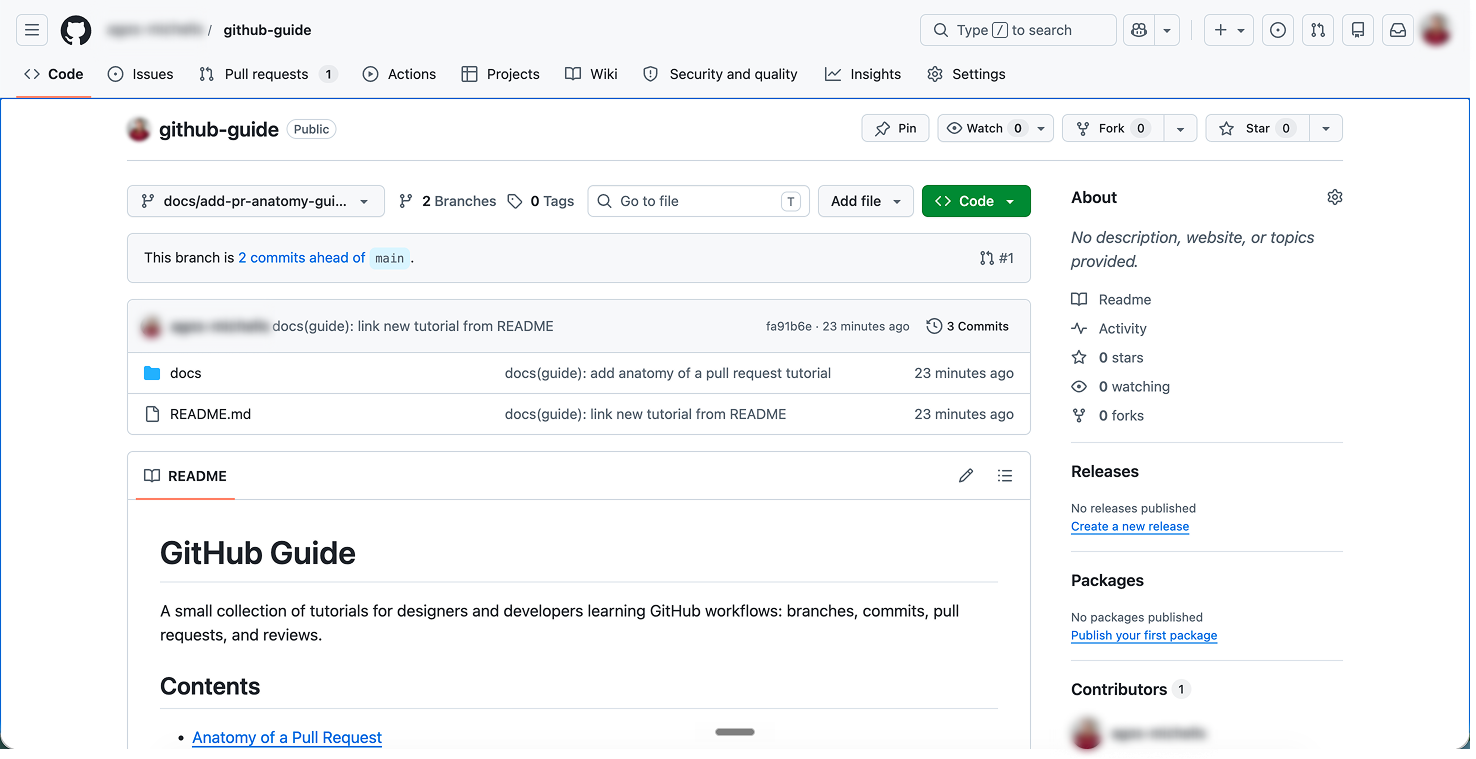
Anatomy of a GitHub repo page
01
02
03
04
Branching
Branching:
never on main
  • Always branch off main — or the branch the client tells you to use
  • Use names that signal what the work is for
  • Match the client's existing convention if there is one
  • When unclear, ask the engineers — once, upfront
→ press arrow / click to reveal
Committing
Commits are
like saving
Think of it as Google Docs autosave, not "final version". Commit often, with small messages. Rolling back becomes trivial. Reviewers can follow your thought process.
$ git log --oneline
a3f8b21 feat: tighten button padding
d8c4e90 feat: add empty state for dashboard
b2a1f73 fix: heading typo on landing
9c1e2a4 feat: wire copy from Figma
e9b5d18 feat: initial layout scaffold
Pull Requests
PRs are your
proposal to ship
A pull request bundles your branch — every commit, every change — into one proposal to merge into main. It's where your work gets seen: reviewers scan the diff, leave comments, and approve before anything goes live.
$ gh pr list
#42 Empty state for dashboard
#41 Tighter button padding on landing
#40 Pricing copy from Figma
#39 Heading fixes — landing page
#38 Initial /settings scaffold
Pull Requests
Your PR is
your design handoff
  • 01Follow the client's PR / branch naming convention
  • 02Keep them under ~500 lines — split into stacked PRs if bigger
  • 03Make it visual — screenshots, a Loom, or the preview URL
  • 04Use draft PRs for prototypes or WIP
→ press arrow / click to reveal
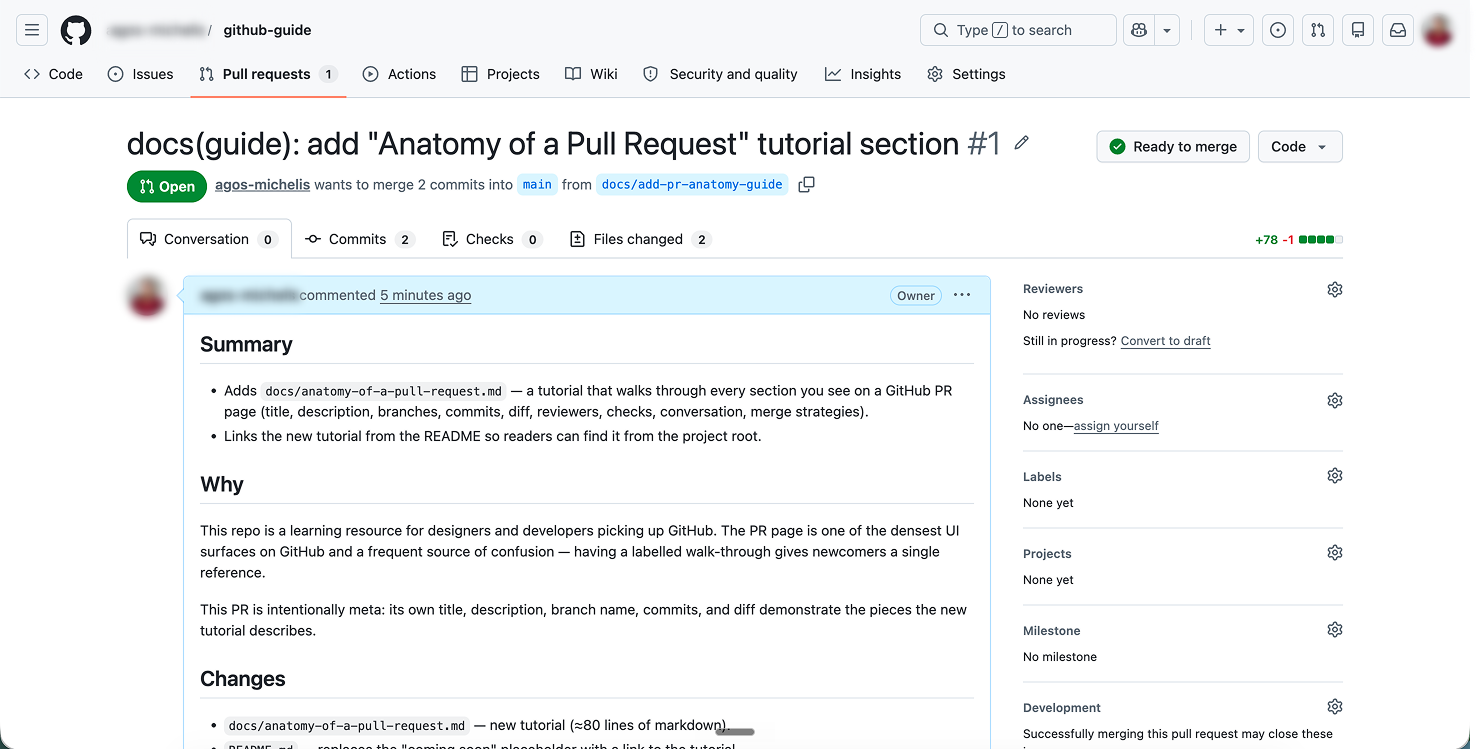
Anatomy of a Pull Request on GitHub
01
02
03
04
Gotchas
Things that
will happen
  • 01Merge conflict — pull latest, resolve in editor, commit, push
  • 02Push rejected — you forgot to pull before starting
  • 03Your branch is behind main — rebase or merge main into yours
  • 04Committed to main by accident — stop, ask an engineer, don't push
→ press arrow / click to reveal
$ git pull Auto-merging README.md CONFLICT (content): Merge conflict in README.md Automatic merge failed; fix conflicts and then commit the result.
$ git push ! [rejected] main -> main (fetch first) error: failed to push some refs to 'https://github.com/user/repo.git' hint: Updates were rejected because the hint: remote contains work that you do hint: not have locally.
$ git status Your branch is behind 'origin/main' by 3 commits, and can be fast-forwarded. (use "git pull" to update your local branch)
$ git status On branch main Your branch is ahead of 'origin/main' by 1 commit. (use "git push" to publish your local commits)
2026
1 / 12